Blog · Health & Wellness · Nov 7, 2026 (updated Nov 7, 2026) · CalorieAI Team · 7 min read
How to Track Calories Burned (and How Far to Trust the Number)
The easiest way to track calories burned is a smartwatch or fitness tracker, which estimates your burn from heart rate, movement and your body details. A cardio machine's display or the MET formula gives you a number for a single workout. All three are estimates, so use them as a rough guide and judge progress by your weekly trend.
That last part matters. Plenty of people close their rings, see a big number at the end of the day, eat a little more because of it, and then wonder why the scale hasn't moved in three weeks. The number on your wrist is useful, just not as exact as the display makes it look.
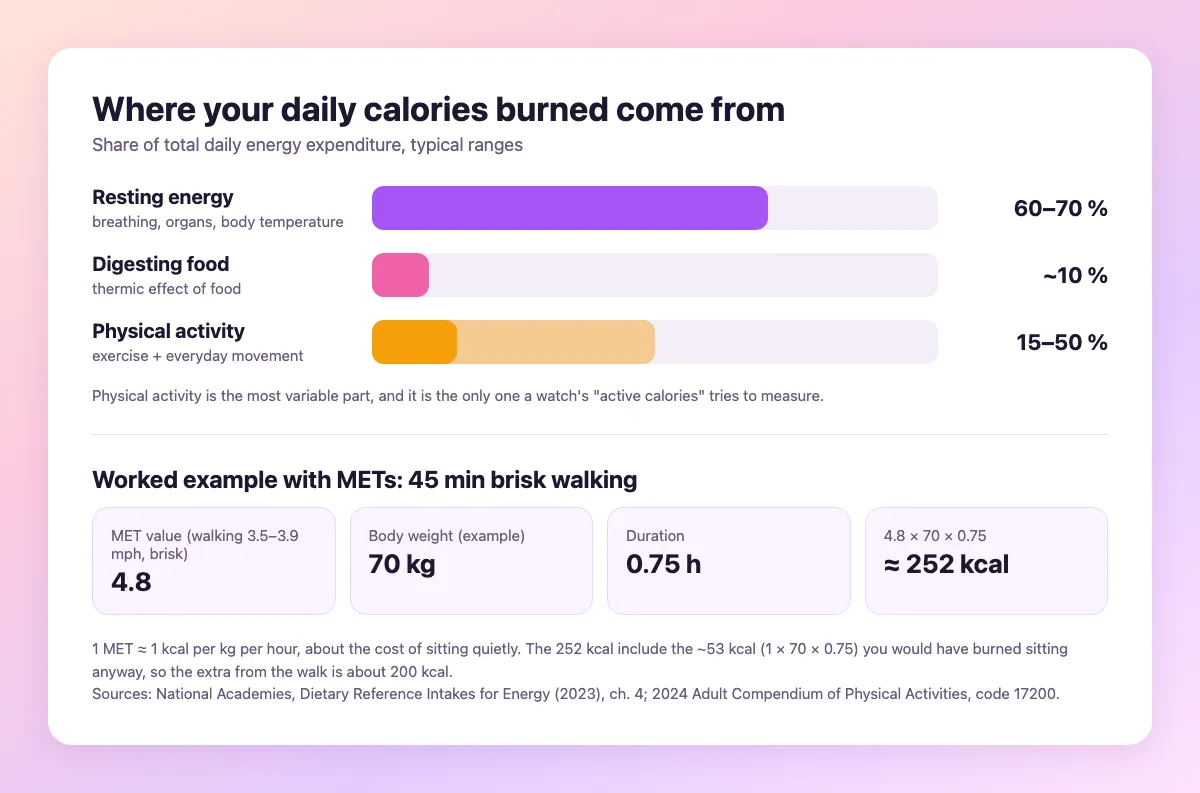
Where your daily burn actually comes from
Your body burns calories all day. Even in your sleep. The National Academies' Dietary Reference Intakes for Energy (2023) splits that total into three parts.
Resting energy is what keeps you alive (breathing, heartbeat, organs, body temperature), and it typically accounts for 60 to 70 percent of the total (National Academies).
Digesting food (the thermic effect of food) takes roughly 10 percent of the total, per the same report.
Physical activity covers the rest. That means workouts, but also walking to the bus, carrying the shopping upstairs and fidgeting at your desk, which is why the same report calls it the most variable part, anywhere from 15 to 50 percent of total burn.
So a workout is one slice of your day. A big one if you sit for most of it. Someone with an active job, on the other hand, might burn more from everyday movement than from any training session.
Watch, machine, formula or scale?
You have four practical ways to put a number on it, and none of them measures your burn directly the way a lab does. They all estimate.
| Method | What it works from | Good for | Weak spot |
|---|---|---|---|
| Smartwatch or fitness tracker | Heart rate, movement and the details you entered (age, weight, height) | The whole day, without effort | Calorie estimates can be off by a wide margin |
| Cardio machine display | Speed, incline or resistance, plus your weight if the machine lets you enter it | One session on that machine | Only as good as the details you give it, and it can't see your actual effort |
| MET formula by hand | Published activity values, your weight and the duration | Any workout, no gadget needed | Average values, not your personal effort |
| Food log plus weekly weigh-ins | What you ate and how your weight moves over weeks | Your real total burn over time | Needs a few weeks of honest logging |
The first three give you a number today. The fourth tells you, after a while, whether those numbers were right for you.
How accurate are calories burned on smartwatches?
Less accurate than their heart rate readings. A Stanford team tested seven wrist-worn devices, including the Apple Watch, Fitbit Surge and Samsung Gear S2, on 60 volunteers while they sat, walked, ran and cycled. Their results appeared as Shcherbina et al. (2017) in the Journal of Personalized Medicine.
In the Shcherbina et al. results, heart rate held up well: six of the seven devices stayed below a 5 percent median error during cycling. Calories did not. No device got its energy error below 20 percent, and the median errors per device ranged from 27.4 to 92.6 percent. The authors also associated higher device error with a higher body mass index and with darker skin tone. The authors concluded that most devices "poorly estimate" energy expenditure and advised caution when using it in health programmes.
Those were 2017 models. Watches have changed since then, and newer studies may show different results, so check the current research for your device. What hasn't changed is how the number is made, because a heart rate reading is a measurement and a calorie figure is a calculation stacked on top of it.
Tracking calories burned on an Apple Watch
On an Apple Watch, Apple's support page on daily activity explains that the red Move ring "shows how many active calories you've burned." The Move number covers active calories only, so read it as a measure of your movement, not as your total burn for the day.
Two things help the estimate, whichever watch you wear:
- Keep your profile current. Weight, height and age feed into the calculation, so update your weight when it changes.
- Start a workout when you train. The watch then knows what kind of activity you're doing instead of guessing.
Even then, treat the Move ring as a motivation tool more than a calorie budget. Closing it daily is a great habit. Eating back every calorie it shows is not.
Estimating a workout with METs
Without a watch, a pen does the job. A MET (metabolic equivalent) compares an activity to sitting still. According to the Compendium of Physical Activities, one MET is about 1 kcal per kilogram of body weight per hour, roughly what sitting quietly costs.
The Compendium lists MET values for hundreds of activities. Brisk walking at 3.5 to 3.9 mph on a firm, level surface is 4.8 METs in the 2024 version. The formula is:
METs × body weight in kg × hours = kcal
Take a person who weighs 70 kg and walks briskly for 45 minutes: 4.8 × 70 × 0.75 comes to about 252 kcal. But about 53 of those (1 × 70 × 0.75) would have been burned sitting on the sofa anyway. The walk itself added roughly 200 kcal.
That subtraction is easy to forget, and it's one reason workout numbers often look bigger than the real extra burn. MET values are also averages for a typical person, so your own effort, fitness and the terrain can push the real figure up or down.
What to do with the number
Here's where it goes wrong. You burn 400 calories on paper, so you eat 400 more, and if the estimate was too high, as the Stanford study suggests it often is, you've quietly wiped out part of the deficit you were working for.
A few habits keep the number useful:
- Don't eat back all of your exercise calories. If you want to eat some back, take a portion and leave the rest as a buffer for estimation error.
- Set your daily target from your normal week. Our guide to how many calories you should eat a day starts from your activity level, so workouts are already part of the plan.
- Compare one watch with itself. Different brands calculate differently. Trends on the same device mean more than any single reading.
- Let the weekly trend have the last word. If you eat about the same each week and your weight stays flat, that tells you your real burn better than any gadget.
That fourth point is the most reliable check you have, though it needs a fairly honest record of what you eat. Most people struggle there. Are Calorie Counting Apps Accurate? covers the food side of the same accuracy problem. And if the numbers say deficit but the scale disagrees, Calorie Deficit but Not Losing Weight? walks through the usual causes, overestimated burn among them.
Tracking both sides of the equation
Burn is half the picture. Intake is the other half, and for most people it's the side with more room for error, simply because logging food takes more effort than wearing a watch.
Calorie AI handles the food side only. You say what you ate, such as "chicken wrap and an apple", and it estimates calories and macros from that sentence. It doesn't measure burn. Your watch or the MET formula still does that. Put the two together, check the weekly average, and adjust your target with the steps in How to Calculate a Calorie Deficit for Weight Loss.
Read next